Container — Spectacles' Spatial UI Primitive
Designing the foundational pattern for moveable UI in AR space
When I joined the Spectacles product design team, the existing approach to moveable UI had several compounding problems. Targeting was fatiguing — the interaction surface was too small for the precision hand tracking demanded. Users struggled to reliably grab and move things in space. And there was no room for system-level functions — close, scale, anchor switching would all have to live somewhere else, solved separately. The experience felt fragile rather than intentional.
There was no spatial UI primitive. There was no pattern. Everything was being solved ad hoc.
Design a spatial UI primitive that makes AR panels feel like first-class objects in space — easy to grab, easy to move, and extensible enough to carry the system functions that flat UI in AR would need over time.
Before jumping to a solution, I needed to map the problem space. Which objects in AR actually need a move affordance?
Not everything behaves the same way. 3D non-interactive objects — models, props — already afford movement naturally. The real-world analogy is direct: any object of reasonable size and weight can just be grabbed and moved. In AR, the same logic applies. Grab the body, communicate the state change through cursor shape or a subtle highlight. No wrapper needed.
2D non-interactive content works the same way. An image, a static display — the whole surface is available as a grab handle.
But 2D interactive content breaks this model. A web page, a UI panel, a system dialog — the whole surface is occupied by controls. Grabbing the body means competing with the content's own interactions.
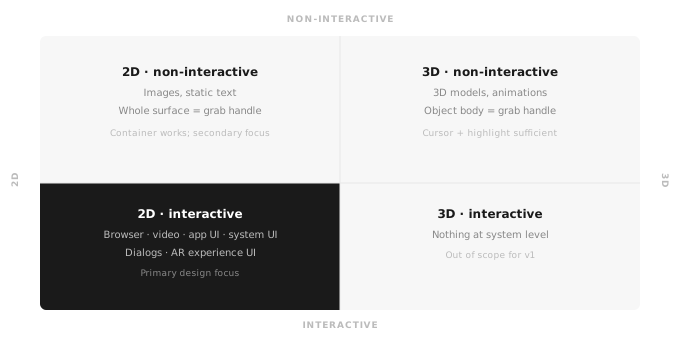
So the question became: how do I keep the same fundamental gesture — grab the object and move it — but relocate the grab surface so it doesn't conflict with the content inside? Mixing world-space manipulation with content interaction on the same surface would require the input system to reliably distinguish intent — and hand tracking at the time wasn't there yet. Separating the two was both a usability decision and a pragmatic one.
The answer was the frame. Use the border around the content as the affordance zone. Wide enough to target reliably. Visually distinct from the inside. And familiar — users already understood window frames from desktop. The learning curve was minimal because the concept wasn't new, just applied to a new context.
That also opened a question: if the affordance had its own dedicated zone, what else could live there?
My process started in Figma — not to produce deliverables, but to think visually. Sketching the frame, exploring what the affordances should communicate, working out where system functions would live.
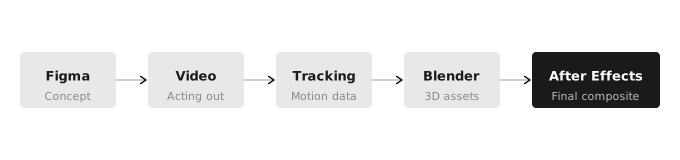
Then I wrote a scenario — a storyboard of interactions I needed my prototype to show: hovering, grabbing, scaling, triggering system buttons. Since this was before agentic tools existed, animation was my fastest path to validation — no Figma prototype could communicate what the interaction felt like in 3D space. I recorded myself acting all of this out, tracked the footage, brought it into Blender and After Effects, built the UI assets in 3D, animated the full interaction model, and comped everything together.
I presented the prototype along with the rationale directly to Evan Spiegel and received sign-off to proceed to real-time prototyping in Lens Studio.
The Container is a frame that wraps around content and makes it a moveable object in AR space. It works in close coordination with the system cursor — the frame and cursor communicate together to make the user's intent legible at every moment.
When the cursor enters the frame, it changes to a move icon — grab here, move the Container. Target any corner and scale handles appear for resizing. System functions — close and anchor switching — occupy dedicated areas on the frame, always accessible without interfering with the content inside. Move the cursor past the frame into the content area, and it transitions to a standard interactive cursor. Two zones, visually and behaviorally distinct — you always know which mode you're in.
Affordance size
The frame margins were deliberately generous — large enough to make targeting forgiving, tuned to balance grabbability against visual footprint. As hand tracking improved over time, the defaults were refined accordingly.
System function space
The frame created real estate for the functions that spatial UI needed: close, world-to-body anchor switching, and scale. These live on the frame itself, contextually, without cluttering the content inside.
Configurability
The Container is a configurable system, not a fixed component. Border size can be adjusted dynamically — tied to distance from the camera, so panels feel more grabbable as they move further away. Developers can toggle scaling, movement, and billboarding on or off. By default, when a user moves a Container it billboards on the Y axis, keeping content legible wherever it lands. System controls — close and anchor switch — can each be disabled. Frame visibility can be always on, or reveal itself on hover.
Schematic recreation · Character rig: Rain by Blender Studio, modified (reposed, animated, lit) · CC BY 4.0
The Container was built internally first, refined through iterative testing, and shipped publicly in the Spectacles Interaction Kit. Neil Cline engineered the full real-time implementation. Every moveable panel on Spectacles is a Container. On a system level, two are always present — Lens Explorer and System Settings. Developers can instantiate multiple Containers within a single experience.
The visual design has evolved as Snap OS has grown. The interaction design has not changed. That stability is the thing I'm most proud of — a spatial UI primitive that became part of Snap OS and has stayed right.
Lens Studio screen recording · © Snap Inc.